Challenges
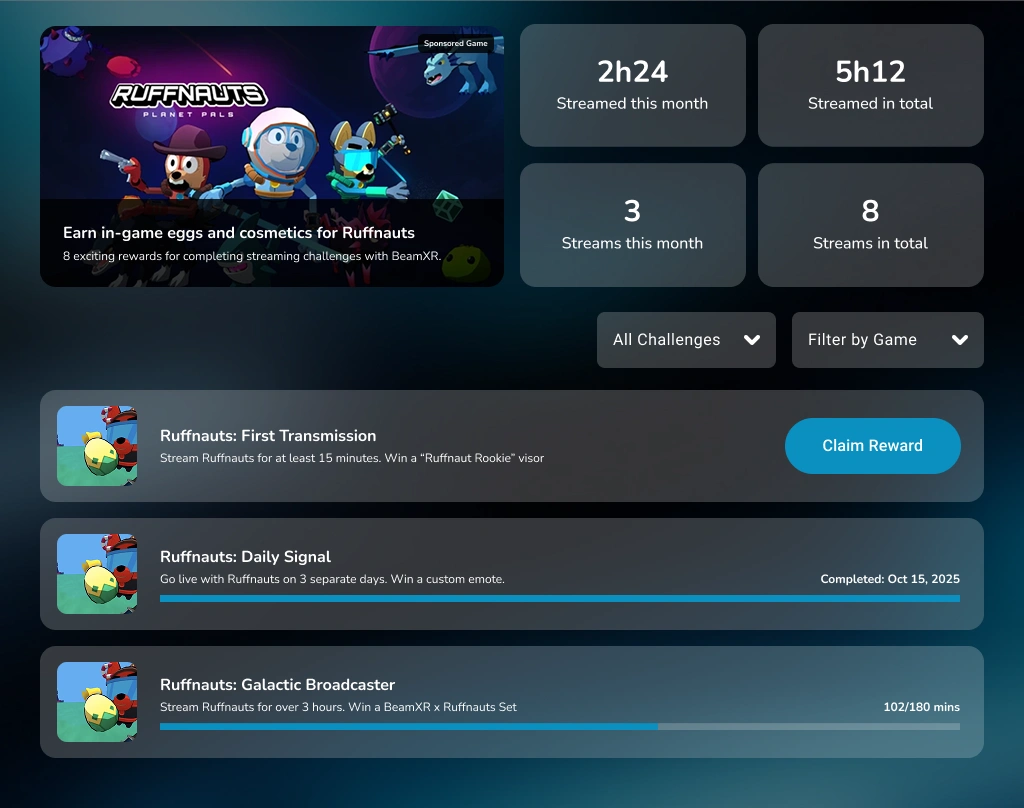
BeamXR Live challenges are a great way to give in-game rewards for streaming activity. We handle all the streaming and track progress or challenge competition. Once a challenge is completed they can claim the reward via:
- Display Code - give the player a code they enter somewhere in your game
- Android Intent - deep link in to your game
- URL - if you want to handle the redemption outside of the game.
To get started please make a copy of our Challenge Template, and fill out the template with your streaming challenges.
| Field | Explanation |
|---|---|
| Reward Code | We return this ID to you when the player claims the reward, so you know which prize to award them. |
| Reward Title | Fun name for the challenge, you can include the prize too |
| Reward Requirement | Written description of the challenge. E.g. Go live three days in a row. |
| Reward Image | Separate image for each challenge - 200x200px (jpg) |
| Reward Rules | You have the following options: Total mins streamed, Mins streamed in a single session, Unique days streamed on, Streak of days streamed on, Stream session count |
Redeeming Rewards
Let us know which of the reward redemption methods you want to use, and the appropriate instructions.
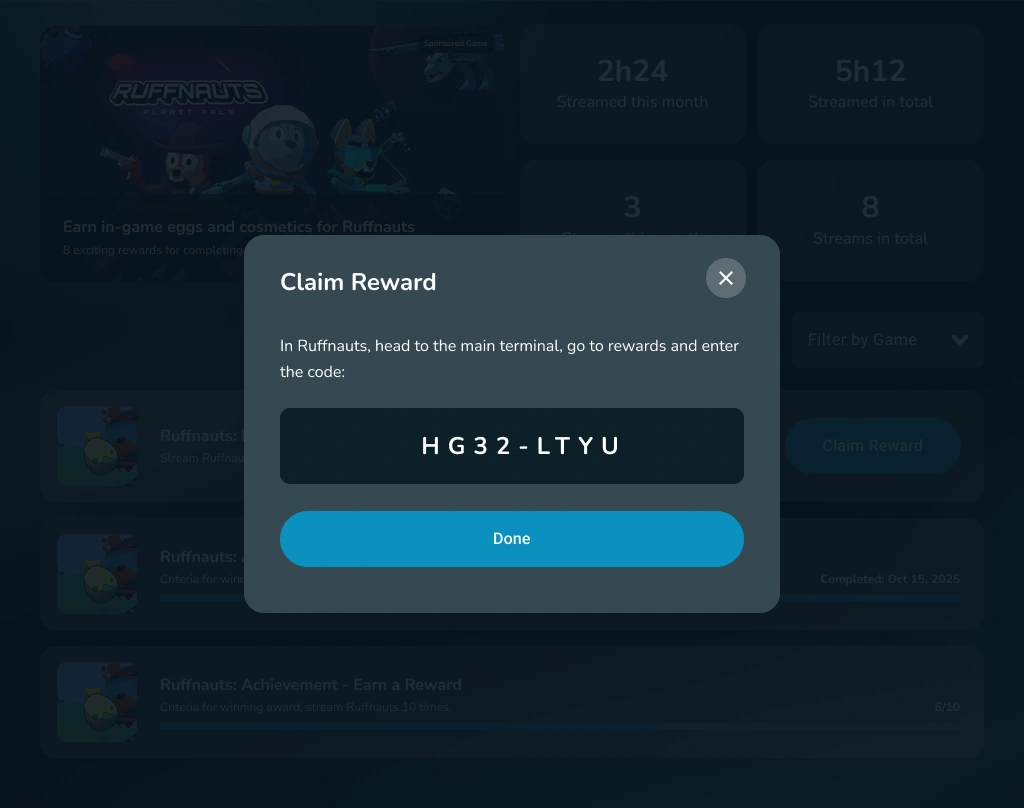
Display Code
Once the player has fulfilled the requirements and pressed claim we present a unique 8-character code in the format ABCD-EFGH to the user with instructions in a template provided by you. The text would read something like this:
"Open {YOUR GAME} and head to the {REWARD MACHINE} and enter code {CODE}".
The player enters the code inside some sort of claims machine in your game and you verify that with the campaign ID, secret and claim code via our endpoint in the form of POST https://api.beamxr.io/campaigns/verifyrewardcode The body should include:
{
	"campaignSecret": "Sly6LwTQ4kqibvhsezrFoQ==",
	"verificationCode": "abc123"
}
If this doesn't exist we'll return 404 If the entitlement does exist then we'll return 200 with this body:
{
	"claimId": 123456,
	"rewardCode" :"UniqueCodeForTheItemBeingClaimed"
}
Android Intent
In this flow the user presses claim in the BeamXR Live app and we call an intent directly within the meta quest to get the claim code over to which can be in one of three forms:
- StartActivity (most common) - we request to start your game directly passing in the activity name and intent action
- Broadcast - we send a broadcast message to an Android service running for your game
- StartService - we request to start a background service with the activity name and intent In all three scenarios we'll send over the achievement code (which represents the players entitlement) and the reward code (which represents the item they are claiming). You can use the entitlements endpoint from section 1 to verify there if you wish.
If this is the way you want to go we'll need:
- Package name (e.g. com.companyname.appname)
- The activity name or service to start (e.g com.companyname.appname.MainActivity) - this is optional
- The name of the intent action to perform (e.g. android.intent.action.VIEW) - this is optional
- The android intent category (e.g. android.intent.category.DEFAULT) - this is optional.
- Any intent flags as a bitmask - this is optional.
- The data url for the intent. In this we'll replace the strings
{achievement.code}and{reward.code}with the actual values. Example:appname://rewards/redeem?achievement={achievement.code}&rewardCode={reward.code}
We'll also always pass these values in the "Extra" fields of the intent as achievementCode and rewardCode.
Again you can use the entitlement endpoint to check this entitlement at POST https://api.beamxr.io/campaigns/verifyrewardcode
Example Redemption Code
var url = currentReward.getRewardActionAndroidIntentDataUriTemplate().replace("{code}", currentReward.getRewardCode()).replace("{verification.code}", currentReward.getAchievementCode());

ComponentName comp = new ComponentName(currentReward.getRewardActionAndroidIntentPackageName(), currentReward.getRewardActionAndroidIntentActivityName());

Intent hard = new Intent(currentReward.getRewardActionAndroidIntentAction(), Uri.parse(url));

if (currentReward.getRewardActionAndroidIntentCategory() != null && !currentReward.getRewardActionAndroidIntentCategory().isEmpty()) {
   hard =  hard.addCategory(currentReward.getRewardActionAndroidIntentCategory());
}
if (currentReward.getRewardActionAndroidIntentFlags() > 0) {
   hard = hard.addFlags(currentReward.getRewardActionAndroidIntentFlags());
}

hard = hard.setComponent(comp);
hard.putExtra("reward_code", currentReward.getRewardCode());
hard.putExtra("verification_code", currentReward.getAchievementCode());

if (isResolvable(getContext(), hard)) {
   tryStart(getContext(), hard);
} else {
   Intent browserIntent = new Intent(Intent.ACTION_VIEW, Uri.parse(url));
   requireContext().startActivity(browserIntent);
}
Web URL
The final and simplest version is where we take the user to a web url of your choosing. In that URL we'll also include the achievement code and reward code so we'll just need a template for that from you. It would be something like:
https://claim.game.com/beamxr?{achievement.code}&rewardCode={reward.code}
When the user presses the "Visit" button we send them off to the claim address in the headset.