Unity Setup
1. Install the SDK Packages
Download the BeamXR Core SDK and BeamXR Enterprise SDK packages.
note
Download links will be provided in a future update.
Import both packages into your Unity project:
- In Unity, go to Assets > Import Package > Custom Package...
- Select the BeamXR Core SDK
.unitypackageand click Import. - Repeat for the BeamXR Enterprise SDK
.unitypackage.
2. Add the Prefab to Your Scene
- In the Project window, search for the BeamXR Enterprise prefab.
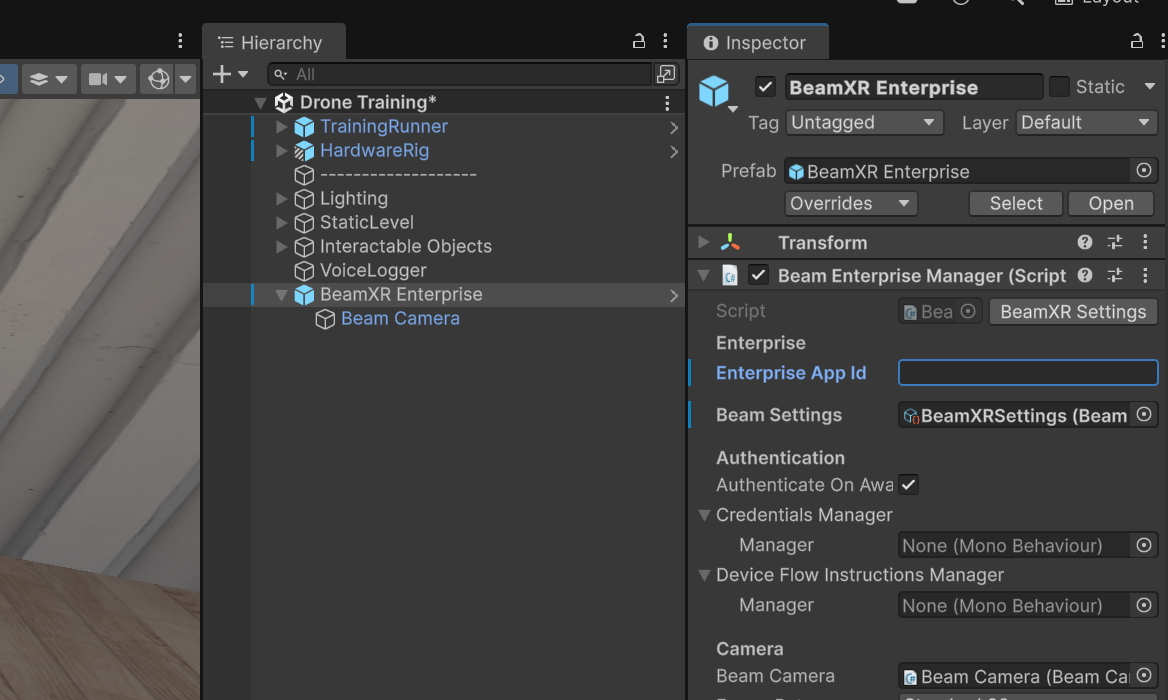
- Drag it into your scene hierarchy.
3. Set Your Enterprise App ID
- Select the BeamXR Enterprise object in your hierarchy.
- In the Inspector, find the Beam Enterprise Manager component.
- Enter your Enterprise App Id in the highlighted field.
Your Unity project is now configured. Head to Your First Session to start streaming.